Subscribe to RSS Feed


Posts Tagged ‘ test ’


Firmware 3.0 jailbreak: RedSn0w for iPhone and iPod Touch

RedSn0w is an easy to use, multi-platform, multi-device jailbreaking and unlocking (iPhone 2G only) tool from DevTeam. It supports firmware 3.0 and iPhone 2G (original iPhone), the iPhone 3G (but not the 3GS) and also the iPod touch (first and second generation):

  • iPhone 2G – jailbreak and unlock
  • iPhone 3G – only jailbreak, use only with official unlocked iPhones (UPDATE: unlock is avaliable)
  • iPod Touch – jailbreak
  • iPod Touch 2G – jailbreak
  • iPod Touch 3GS – not supported (UPDATE: is supported by version 0.8)

Currently it is available for Windows and Mac OS X. The tool works just like QuickPwn. If you want to build custom firmware files with more flexibility it is suggested that you use PwnageTool on Mac OS X.

  • GOLDEN RULE: If you are using a 3G iPhone with yellowsn0w and rely on yellowsn0w to obtain cellular service, then you should NOT use redsn0w right now. Ultrasn0w (the 3G carrier unlock) is not included with this release and therefore your baseband will be locked and unable to use an operator other than the official one it was bought for. UltraSn0w will be released via APT (cydia and icy) soon. If you have an original iPhone (1st generation) then 3.0 carrier unlock works with this redsn0w release.
  • Yellowsn0w in its current form will NOT work with the baseband version that is present in the 3.0 update, you will need Ultrasn0w, which will be released sometime soon (update: released), Ultrasn0w will work with all iPhone 3G models (but not 3GS), even ones that were previously unlockable, Ultrasn0w will be released via APT (this means you will be able to get it via Cydia or Icy).
  • Please read all parts of this post before downloading and using these tools.
  • Read items 1, 2 and 3 again and again.
  • At the bottom of this post are the bittorrent files for the latest version of redsn0w.
  • This app is suitable for the recent 3.0 release
  • redsn0w will NOT work for the iPhone 3GS.
  • redsn0w WILL work for Original iPhone (1st Generation), Original iPod touch, iPod touch 2G and the iPhone 3G (not the iPhone 3GS).
  • To use redsn0w simply upgrade the device in iTunes to firmware version 3.0 and run redsn0w to activate and jailbreak the device (and if you are using an original iPhone 2G, it will unlock it too!)

    You can donwload RedSn0w 0.7 here.


    Read the rest of this entry »


    Tags: , , , , , , , , , , , , , , , , , , , , , , , , , , , , , , , , , , , , , , , , , , , , , , , , , , , , ,

    3 Comments

    DevTeam about firmware 2.2

    November 21, 2008 by


    DevTeam about firmware 2.2

    DevTeam says that 2.2 update SHOULD NOT be applied using iTunes if you want the chance of a soft-unlock in the near future. Use new version of PwnageTool (not avaliable yet, but will be soon).

    Some fact:

    • The 2.2 firmware for 3G contains a baseband update for the 3G iPhone
    • The 2.2 firmware for 2G (1st gen iPhones) doesn’t contain a baseband update and the baseband is still at 04.05.04
    • Pwnage technique (and therefore the Jailbreak) isn’t affected, but PwnageTool and QuickPwn do not support this release as yet, so DO NOT install 2.2 using iTunes as you will lose your jailbreak

    Read the rest of this entry »


    Tags: , , , , , , , , , , , , , , , , , , , , , , , , , , , , , , , , , , , , , , , , , , , ,

    Comments Off


    QuickPwn 2.1 for Windows is ready

    Congratulations, Windows users. The support for new firmware 2.1 is added. So here is what you can do:

    • Support for FW v2.0.1, v2.0.2, v2.1.0
    • Jailbreaking and Pwning iPhone 2G, iPhone 3G and iPod Touch
    • Adding Cydia and Installer
    • Replacing boot logos
    • Unlocking iPhone 2G

    Changes from QuickPwn RC3

    • Support for firmware 2.1
    • Auto-detection of firmware version, insistence on correct firmware bundle to prevent user epic fail.
    • Use of iASign to activate to prevent bspatch epic fail.
    • Removed buggy and never really tested 2.0 support

    Sorry, no jailbreak for new iPod Touch and no unlock for iPhone 3G.

    Here are download links:

    Firmwares v2.1: 2g firmware, 3g firmware

    Related posts:


    Read the rest of this entry »


    Tags: , , , , , , , , , , , , , , , , , , , , , , , , , , , , , , , , , ,

    Comments Off


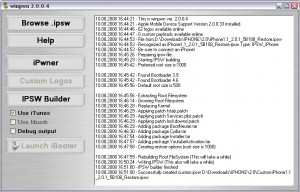
    WinPwn 2.0.0.4 with support of 2.0.1 firmware

    PwnageTool 2.0.2 released just a day ago. And now WinPwn – iPhone jailbreaker and unlocker for windows is avaliable. The main new feature – it supports firmware 2.0.1.

    Download 2.0.0.4:

    Download firmwares: iPhone 1.1.4, 2.0, 2.0.1, iPhone 3G 2.0, 2.0.1

    2.0.0.4 features:

    • Support for both 1.1.4, 2.0, 2.0.1
    • Root partition resize support
    • Installer support
    • Support for WinXP and Vista 32/64bit.

    Notes are as usual:

    • You MUST do a full uninstall of winpwn before installing the new version
    • Make sure you have the latest version of iTunes (from 7.7)
    • WinPwn uses 300MB of ram at peak due to the ipsw being extracted in memory
    • You must first click browse and load an IPSW to use WinPwn (i thought this was clear)
    • For 2.0 only the *5A347_Restore.ipsw files are valid. The 345 image will not work
    • If you see Failed to load image catalog/payload catalog, this is fine and won’t cause problems
    • If you already have service with AT&T do not activate or install Youtube Fix
    • As usual jailbreak for iPhone and iPhone 3G, unlock only for iPhone.
    • It is recommended to use at least 550mb partition size to accommodate a space issue that causes some folks errors such as “the ipsw failed to create”.

    How to:


    Read the rest of this entry »


    Tags: , , , , , , , , , , , , , , , , , , , , , , , , , , , , , , , , , , , , , , ,

    Comments Off


    PwnageTool 2.0.2 is avaliable

    PwnageTool 2.0.2 is out. It will support new firmware 2.0.1. It will jailbreak and unlock the old iPhone and jailbreak new iPhone 3G. Here are the download links:

    Installer 4 Beta is included, it is added in any mode by default.  The main installer package management interface within PwnageTool isn’t enabled yet, and will report that installer.app isn’t available, but the actual Installer.app package is added as a default option in both modes.

    The latest Cydia is also enabled by default. We recommend to use Cydia, not Installer.


    Read the rest of this entry »


    Tags: , , , , , , , , , , , , , , , , , , , , , , ,

    Comments Off