Subscribe to RSS Feed


Posts Tagged ‘ winpwn ’


QuickPwn 2.1 for Windows is ready

Congratulations, Windows users. The support for new firmware 2.1 is added. So here is what you can do:

  • Support for FW v2.0.1, v2.0.2, v2.1.0
  • Jailbreaking and Pwning iPhone 2G, iPhone 3G and iPod Touch
  • Adding Cydia and Installer
  • Replacing boot logos
  • Unlocking iPhone 2G

Changes from QuickPwn RC3

  • Support for firmware 2.1
  • Auto-detection of firmware version, insistence on correct firmware bundle to prevent user epic fail.
  • Use of iASign to activate to prevent bspatch epic fail.
  • Removed buggy and never really tested 2.0 support

Sorry, no jailbreak for new iPod Touch and no unlock for iPhone 3G.

Here are download links:

Firmwares v2.1: 2g firmware, 3g firmware

Related posts:


Read the rest of this entry »


Tags: , , , , , , , , , , , , , , , , , , , , , , , , , , , , , , , , , ,

Comments Off

Be carefull – avoid fakes

September 17, 2008 by


Be carefull – avoid fakes

Be very very carefull. Because there are so many fake web sites came out recently. Do not trust names like quickpwn.com. There sites pretend to be DevTeam. Applications that those sites give you might be dangerous for your iPhone. Some sites ask for donations. Remember DevTeam don’t do it.

There is only one DevTeam’s site: http://blog.iphone-dev.org. When I publish news about some new version of QuickPwn, WinPwn, PwnageTool and etc, I use links from DevTeam’s site. Everything else could be harmful fake.


Read the rest of this entry »


Tags: , , , , , , , , , , , , , , ,

Comments Off

QuickPwn, PwnageTool and WinPwn

September 8, 2008 by


QuickPwn, PwnageTool and WinPwn

There are so many tools, some for Mac OS, others for Windows, different versions… Complicated. So let’s summerize a little bit.

If you have iPhone 3G, you’ll be able to install 3-rd party non AppStore applications (through separate applications called Cydia and Installer) and run these applications. If you have old iPhone, in addition to that you’ll be able to unlock the device (use with any carrier).

There are two methods: quickpwn and custom firmware method. First one is for quikly pwning and jailbreaking  the device without restore. You should use it if you have unlocked device or an AT&T contract.

If you are Windows user:

  • Go for WinPwn. The current version is 2.5.0.2 (also called 2.5 beta-2). Download here. It supports both iPhone and iPhone 3G, firmwares 2.0, 2.0.1, 2.0.2. You can use either quickpwn or custom firmware method.
  • There is a separate QuickPwn tool for Windows. The current version is RC3. Download here. Do you need it? Yes, if you want to quick pwn and you do not like WinPwn (or you had problems with it).

If you’re using Mac OS:

  • Go for PwnageTool. The current version is 2.0.3.1. Download here. Works with 2.0, 2.0.1, 2.0.2 firmwares using custom-firmware method.
  • There is a version of QuickPwn tool for MAC OS. The current version is 1.0.0. Download here. It works only with firmware 2.0.2. Do you need it? Yes, if you want to quick pwn.
    QuickPwn is not a replacement for PwnageTool, they are different tools and provide different features, QuickPwn is for quickly pwning a device, whereas PwnageTool is designed to custom build and tailor the ipsw production process, both tools will be actively developed in the future.

    Read the rest of this entry »


    Tags: , , , , , , , , , , , , , , , , , , , , , , , , , , , , , , , , , , , , ,

    Comments Off


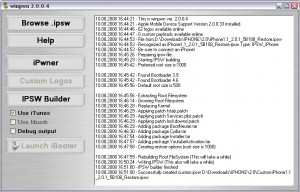
    WinPwn 2.0.0.4 with support of 2.0.1 firmware

    PwnageTool 2.0.2 released just a day ago. And now WinPwn – iPhone jailbreaker and unlocker for windows is avaliable. The main new feature – it supports firmware 2.0.1.

    Download 2.0.0.4:

    Download firmwares: iPhone 1.1.4, 2.0, 2.0.1, iPhone 3G 2.0, 2.0.1

    2.0.0.4 features:

    • Support for both 1.1.4, 2.0, 2.0.1
    • Root partition resize support
    • Installer support
    • Support for WinXP and Vista 32/64bit.

    Notes are as usual:

    • You MUST do a full uninstall of winpwn before installing the new version
    • Make sure you have the latest version of iTunes (from 7.7)
    • WinPwn uses 300MB of ram at peak due to the ipsw being extracted in memory
    • You must first click browse and load an IPSW to use WinPwn (i thought this was clear)
    • For 2.0 only the *5A347_Restore.ipsw files are valid. The 345 image will not work
    • If you see Failed to load image catalog/payload catalog, this is fine and won’t cause problems
    • If you already have service with AT&T do not activate or install Youtube Fix
    • As usual jailbreak for iPhone and iPhone 3G, unlock only for iPhone.
    • It is recommended to use at least 550mb partition size to accommodate a space issue that causes some folks errors such as “the ipsw failed to create”.

    How to:


    Read the rest of this entry »


    Tags: , , , , , , , , , , , , , , , , , , , , , , , , , , , , , , , , , , , , , , ,

    Comments Off


    xpwn 0.3 sources are now up

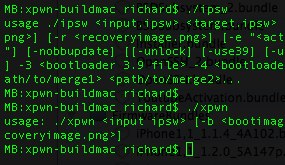
    The development sources for xpwn 0.3, the firmware 2.0 version of our cross-platform jailbreaking library/command-line utility have been pushed onto github. DevTeam tested it on Linux, Windows XP, and Windows Vista for both the iPhone 2G and iPhone 3G thus far, but since it uses the same FirmwareBundles files as PwnageTool, and we know those work for the iPod touch, there ought not be any problems.

    Being a suite of command-line utilities, this release is meant primarily for developers. While you can certainly jailbreak (both 3G and first-gen) and unlock (first-gen) with it, it’s not really something you want to try without reading the lengthy, detailed README. If you don’t have the patience to do that, this release is not for you.

    For users this news mean that quite soon there will be a new version of winpwn, supporting 2.0.


    Read the rest of this entry »


    Tags: , , , , , , , , , , , , , , , , , , , , , , , , , , , , ,

    Comments Off