These are instructions on how to jailbreak your iPhone using PwnageTool 4.1.2 for Mac OS X. If you need unlock and you have not updated to iOS 4 you will be able to preserve baseband and unlock iPhone using ultrasn0w.
This guide will work for iPhone 4, iPhone 3GS, iPhone 3G, iPod Touch 3G, iPod Touch 4G, iPad and AppleTV. Just use the right firmware and select the right device (step four).
Step One
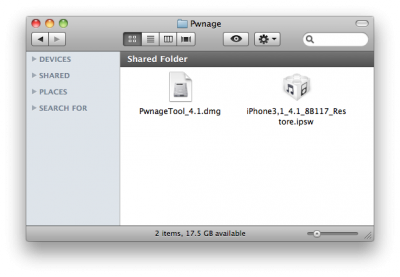
Make a folder called “Pwnage” on the desktop. Now you need to download there PwnageTool 4.1.2 from and iOS 4.1 firmware from .
When downloading the IPSW file, it is best to download it with Firefox since Safari often auto extracts it!
Step Two
Double click to mount PwnageTool then drag the PwnageTool icon into the Pwnage folder.
With internet tethering enabled you can use iPhone internet connection on you desktop or notebook. Here is a quick tutorial for experienced users. For everybody else – just wait for the new version of PwnageTool or some other utility.
Here it is:
A bsdiff patch to apply to CommCenter in 3.1.2 to re-enable tethering is available and . It’s just a 2-byte patch as shown below (and an appropriate readjusting of the mach-o’s codesign hash):
USE THIS AT YOUR OWN RISK! Your carrier may end up charging you for unauthorized tethering access.
Update #1 It looks like a lot of people have been looking at CommCenter lately because IRC user CleanAir had a similar tethering patch. Meanwhile over in the 2G CommCenter, WhiteRat and geniusan for that platform. Kudos to CleanAir, WhiteRat, and geniusan for digging into CommCenter and coming up with patches!
Update #2 A few have started to pop up. Eventually this will be made a part of the normal PwnageTool flow but for now this is best left for the adventurous users out there!
DevTeam says that 2.2 update SHOULD NOT be applied using iTunes if you want the chance of a soft-unlock in the near future. Use new version of PwnageTool (not avaliable yet, but will be soon).
Some fact:
The 2.2 firmware for 3G contains a baseband update for the 3G iPhone
The 2.2 firmware for 2G (1st gen iPhones) doesn’t contain a baseband update and the baseband is still at 04.05.04
Pwnage technique (and therefore the Jailbreak) isn’t affected, but and do not support this release as yet, so DO NOT install 2.2 using iTunes as you will lose your