Subscribe to RSS Feed


Posts Tagged ‘ ed ’

QuickPwn updated to 1.2.0

August 21, 2008 by


QuickPwn updated to 1.2.0

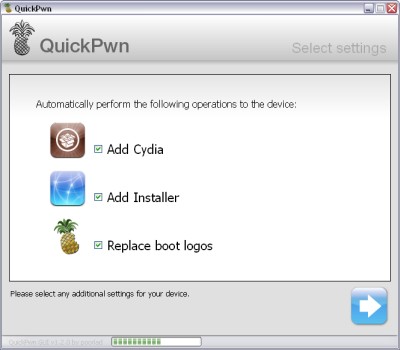
QuickPwn for Windows is updated. Support for all 2.x firmwares is added. So now you can QuickPwn and jailbreak the device if it is running 2.0, 2.0.1 or 2.0.2.

DevTeam reminds that it is still beta software, so usual rules apply, no complaints if anything goes wrong and use the tool at at your own risk!

Download here!

Using QuickPwn does not update the firmware itself, this tool is designed to ‘Pwn’ (the ability to install future custom non-Apple firmwares) , ‘Jailbreak’ and install Installer and/or Cydia on a given device. If your device is running 2.0.1 and you QuickPwn it, it’ll still be running 2.0.1, although it will now be Pwned and Jailbroken. It will also activate (not unlock) devices that are being used outside of their intended territories and cannot be activated using iTunes.

If you want to update to 2.0.2 then use the normal iTunes update to get to 2.0.2 and then use QuickPwn to Pwn, Jailbreak and Activate, remember that the 2.0.2 update includes a baseband update for the 3G iPhone, so depending what your long term intentions are for the phone, update wisely, of course in the upcoming PwnageTool application you’ll be able to create a custom ipsw without the baseband update enabled.

PS: Mac OS version is on it’s way.


Read the rest of this entry »


Tags: , , , , , , , , , , , , , , , , , , , , , , , , , , , , , , , , , , ,

Comments Off


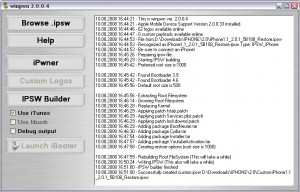
WinPwn 2.0.0.4 with support of 2.0.1 firmware

PwnageTool 2.0.2 released just a day ago. And now WinPwn – iPhone jailbreaker and unlocker for windows is avaliable. The main new feature – it supports firmware 2.0.1.

Download 2.0.0.4:

Download firmwares: iPhone 1.1.4, 2.0, 2.0.1, iPhone 3G 2.0, 2.0.1

2.0.0.4 features:

  • Support for both 1.1.4, 2.0, 2.0.1
  • Root partition resize support
  • Installer support
  • Support for WinXP and Vista 32/64bit.

Notes are as usual:

  • You MUST do a full uninstall of winpwn before installing the new version
  • Make sure you have the latest version of iTunes (from 7.7)
  • WinPwn uses 300MB of ram at peak due to the ipsw being extracted in memory
  • You must first click browse and load an IPSW to use WinPwn (i thought this was clear)
  • For 2.0 only the *5A347_Restore.ipsw files are valid. The 345 image will not work
  • If you see Failed to load image catalog/payload catalog, this is fine and won’t cause problems
  • If you already have service with AT&T do not activate or install Youtube Fix
  • As usual jailbreak for iPhone and iPhone 3G, unlock only for iPhone.
  • It is recommended to use at least 550mb partition size to accommodate a space issue that causes some folks errors such as “the ipsw failed to create”.

How to:


Read the rest of this entry »


Tags: , , , , , , , , , , , , , , , , , , , , , , , , , , , , , , , , , , , , , , ,

Comments Off


PwnageTool 2.0.2 is avaliable

PwnageTool 2.0.2 is out. It will support new firmware 2.0.1. It will jailbreak and unlock the old iPhone and jailbreak new iPhone 3G. Here are the download links:

Installer 4 Beta is included, it is added in any mode by default.  The main installer package management interface within PwnageTool isn’t enabled yet, and will report that installer.app isn’t available, but the actual Installer.app package is added as a default option in both modes.

The latest Cydia is also enabled by default. We recommend to use Cydia, not Installer.


Read the rest of this entry »


Tags: , , , , , , , , , , , , , , , , , , , , , , ,

Comments Off


Bad news is that it is still not avaliable. DevTeam postponed their release. The good news is that version 2.0.2 will jailbreak 2.0.1 fimware (and unlock 2.0.1 for old iPhone) and have both Cydia and Installer 4 included. Stay tuned, the release will be in couple days.


Read the rest of this entry »


Tags: , , , , , , , , , , ,

Comments Off


Get internet on a desktop or notebook through IPhone 3G

Thanks to Dev Team and the porting work of Jay Freeman as well as the authors of 3Proxy, it is now possible to “tether” your iPhone 3G and use its Internet connection on your laptop.

WarningTethering your iPhone is against the iPhone data plan terms. AT&T could slap you with huge fees if you overuse this. I recommend only using it during emergencies.

Here is a basic plan (by the way, this should work for old IPhone also):

  • Jailbreak your iPhone 3G
  • Install 3Proxy and Terminal
  • Create an ad-hoc Wi-fi network using your laptop
  • Join the network with your iPhone
  • Find the iPhone’s IP address
  • Open Terminal and run the proxy program
  • Open Safari on your iPhone and open a web page
  • Configure your browser to use the proxy

Later we’ll discuss it with more details.

Step 1: Jailbreak your iPhone


Read the rest of this entry »


Tags: , , , , , , , , , , , , , , , , , , , , , , , , , , , , , , , , ,

1 Comment