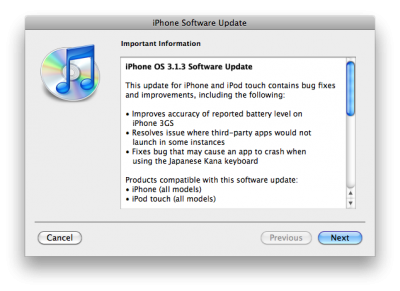
So this is a minor update, which fixing only the accuracy of the 3GS battery meter and the stability of some third-party app launches. This update is avaliable via iTunes.
New firmware 3.1.3 also introduces a new version of the baseband, the 05.12.01. So if you need unlock do not update! DevTeam also warns us:
If you care about your jailbreak and unlock, don’t update your device – 3G and 3G(S) owners should pay particular attention to this warning.
PwnageTool and redsn0w are not yet compatible with 3.1.3
Experimenters show that the latest version of redsn0w 0.9.2 is able to jailbreak iPhone 2G, iPhone 3G and iPod touch 1G. Just point it at the 3.1.2 IPSW (download ) after doing update or restore to firmware 3.1.3. Sounds like DevTeam will release an updated version of redsn0w that will handle firmware 3.1.3 officially. They say iPod touch 2G with firmware 3.1.3 is also jailbreakable.
Users report that unlock software, blacksn0w and ultrasn0w, doesn;t work with the new baseband.
Thanks to and the porting work of as well as the authors of , it is now possible to “tether” your iPhone 3G and use its Internet connection on your laptop.
Warning – Tethering your iPhone is against the iPhone data plan terms. AT&T could slap you with huge fees if you overuse this. I recommend only using it during emergencies.
Here is a basic plan (by the way, this should work for old IPhone also):