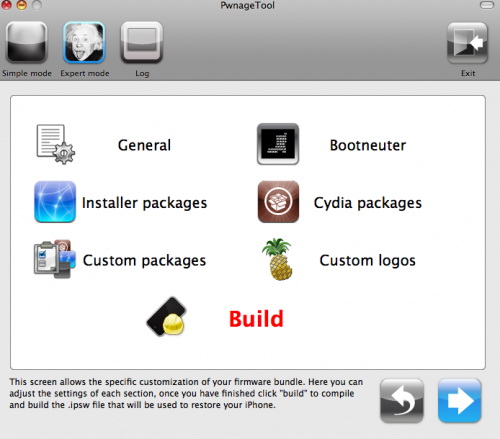
In the video we see a preview of the graphic interface and the first functions. At startup we choose the expert or the simple mode and the rest should be exactly as we know it already.
With internet tethering enabled you can use iPhone internet connection on you desktop or notebook. Here is a quick tutorial for experienced users. For everybody else – just wait for the new version of PwnageTool or some other utility.
Here it is:
A bsdiff patch to apply to CommCenter in 3.1.2 to re-enable tethering is available and . It’s just a 2-byte patch as shown below (and an appropriate readjusting of the mach-o’s codesign hash):
USE THIS AT YOUR OWN RISK! Your carrier may end up charging you for unauthorized tethering access.
Update #1 It looks like a lot of people have been looking at CommCenter lately because IRC user CleanAir had a similar tethering patch. Meanwhile over in the 2G CommCenter, WhiteRat and geniusan for that platform. Kudos to CleanAir, WhiteRat, and geniusan for digging into CommCenter and coming up with patches!
Update #2 A few have started to pop up. Eventually this will be made a part of the normal PwnageTool flow but for now this is best left for the adventurous users out there!
DevTeam released PwnageTool 3.1. This utility will allow users of iPhone 2G, iPhone 3G, iPod Touch to run jailbreaked firmware 3.1. We still recommend staying on firmware 3.0/3.0.1 for as long as possible. The 3.1 firmware is not worth it. But if you really want 3.1. Here are the details:
If you are using a 3G iPhone with ultrasn0w and rely on ultrasn0w to obtain cellular service, then you should only upgrade to 3.1 with a PwnageTool created .ipsw. Never update using Apple’s unmodified firmware. Stay away from Apple’s direct updates.
This version of PwnageTool WILL NOT work for the iPhone 3GS and iPod Touch 2G/3G.
PwnageTool WILL work for Original iPhone (1st Generation), Original iPod touch (1st Generation) and the iPhone 3G.
It works only with Mac OS X.
Future releases of PwnageTool and RedSn0w will be soon with more functionality.
Here is per device info:
iPhone 3G (unlocked): This model of iPhone 3G doesn’t have an Service Provider lock (aka factory unlocked) and you are able to put any SIM card into the phone and get service. Your phone is already unlocked so you do not need to worry about baseband updates, simply upgrade to 3.1 using iTunes and then use PwnageTool to create an ipsw and then use this to jailbreak your phone.
iPhone 3G (locked): You need to preserve 3.0 baseband. Create a custom firmware.
iPhone 2G (1st Generation): Use PwnageTool to do the magic and then restore with iTunes using your newly created .ipsw, you don’t need to worry about anything, the baseband will be unlocked, the phone jailbroken.
iPod touch 1G (Original iPod Touch): Use PwnageTool to create a firmware image and restore with that .ipsw using iTunes.
iPod touch 2G: Sorry, no support at this time within PwnageTool, use Redsn0w for an earlier (pre 3.1) firmware release instead.
iPod touch 3G (New iPod Touch): Sorry, no support at this time within PwnageTool.
RedSn0w is an easy to use, multi-platform, multi-device jailbreaking and unlocking (iPhone 2G only) tool from DevTeam. It supports firmware 3.0 and iPhone 2G (original iPhone), the iPhone 3G (but not the 3GS) and also the iPod touch (first and second generation):
iPhone 3G – only jailbreak, use only with official unlocked iPhones (UPDATE: unlock is )
iPod Touch – jailbreak
iPod Touch 2G – jailbreak
iPod Touch 3GS – not supported (UPDATE: is supported by version 0.8)
Currently it is available for Windows and Mac OS X. The tool works just like QuickPwn. If you want to build custom firmware files with more flexibility it is suggested that you use on Mac OS X.
GOLDEN RULE: If you are using a 3G iPhone with yellowsn0w and rely on yellowsn0w to obtain cellular service, then you should NOT use redsn0w right now. (the 3G carrier unlock) is not included with this release and therefore your baseband will be locked and unable to use an operator other than the official one it was bought for. will be released via APT (cydia and icy) soon. If you have an original iPhone (1st generation) then 3.0 carrier unlock works with this redsn0w release.
Yellowsn0w in its current form will NOT work with the baseband version that is present in the 3.0 update, you will need , which will be released sometime soon (update: ), Ultrasn0w will work with all iPhone 3G models (but not 3GS), even ones that were previously unlockable, Ultrasn0w will be released via APT (this means you will be able to get it via Cydia or Icy).
Please read all parts of this post before downloading and using these tools.
Read items 1, 2 and 3 again and again.
At the bottom of this post are the bittorrent files for the latest version of redsn0w.
This app is suitable for the recent 3.0 release
redsn0w will NOT work for the iPhone 3GS.
redsn0w WILL work for Original iPhone (1st Generation), Original iPod touch, iPod touch 2G and the iPhone 3G (not the iPhone 3GS).
To use redsn0w simply upgrade the device in iTunes to firmware version 3.0 and run redsn0w to activate and jailbreak the device (and if you are using an original iPhone 2G, it will unlock it too!)
DevTeam says that 2.2 update SHOULD NOT be applied using iTunes if you want the chance of a soft-unlock in the near future. Use new version of PwnageTool (not avaliable yet, but will be soon).
Some fact:
The 2.2 firmware for 3G contains a baseband update for the 3G iPhone
The 2.2 firmware for 2G (1st gen iPhones) doesn’t contain a baseband update and the baseband is still at 04.05.04
Pwnage technique (and therefore the Jailbreak) isn’t affected, but and do not support this release as yet, so DO NOT install 2.2 using iTunes as you will lose your